My site is primarily content-driven, and as such I should put as much time and care into it as I will the coding of the overall site. It is also important to follow the content-first approach we have learned over the course of the MA, and I should therefore start with the content. The site’s content will include:
home page – very simple with prominent navigation
tutorial pages ~ 9-10 in total – video, images, instructions, relevant links
Your setup/getting started – text, images
Safety – text, images
About – text, image
Content Production
I intend to film resincraft tutorials using a static, top-down approach, where the workstation is the focus of the video. As there will be no movement, the camera will be mounted on a Jaws desktop mount for stability. I also intend to shoot footage on an iPhone 13. As the card artist Cathy Zielske points out in her demonstration of how she films her own tutorials, modern iPhones are more than adequate for capturing quality footage, particularly if the camera is stationary. Lighting the workstation adequately will also be taken into account, and I will consider using a desktop ring light.
Video will not feature recorded sound, as I intend to use added voiceover to narrate the tutorial steps. Not only will this help avoid any unwanted background noise, I will not need to rerecord entire videos simply because of issues with my wording or other audio hiccups. Voiceover can be recorded directly into iMovie. According to Think Media’s tutorial on voiceover, modern MacBook Pros have good quality built-in mics, but I will test to see if the audio quality would be improved with an external microphone.
For accessibility, my video tutorials will use closed captions.
I intend to create my tutorials and images over the course of mid-May – mid-June, immediately after the Prototype crit session. With fewer deadlines to work on, I believe I will be able to give my content the focus it needs. I will also begin writing the text content for my pages.
Videos will then be published on Youtube. I believe it is necessary to upload to Youtube despite its monetised ads, because according to my research with the Reddit community, beginner crafters often use Youtube as their starting point for learning. It is also more financially viable for me, as other video hosts often require a payment plan. However, I will consider Vimeo, which has limited free options.
Site Promotion
I will set up a Cure8 Instagram account to promote the website, as well as add relevant posts to my Mastodon account. Furthermore, I intend to post as myself in the /Resin community on Reddit. I do not believe that posting from an official Cure8 account would be well-received on Reddit, which seems to favour communicating with individuals rather than brands looking to ‘sell’ something.
Posts on Instagram will feature images of created works accompanied by the Cure8 logo. These will be created and optimised in PhotoShop. I will also upload short clips of tutorials or works in progress featuring royalty-free background music. The Splice video editing app allows users to create content directly on their phones and features a wide range of royalty-free music.
Posts on all three platforms will be made regularly for the duration of the project’s creation (May – September), as well as beyond. Instagram posts can be made at least twice weekly as a quick way to build followers (there are currently 12m posts featuring the #resin tag, and 11.7m featuring #resinart).
Technology
Domain name
I decided that as my website’s name is cure8, I would use the simple domain name cure8.uk . As prices given for crafting materials will be in GBP, there is therefore a need for geographical clarity in my domain name. I bought this domain name from Clook (£15.98 GBP for 2 years), as it appeared to be better value than Google’s £10 per year cost.
Hosting
While we have been using Clook for our coursework hosting so far, I thought it best to explore other options. According to several sites including crazyegg.com, Hostinger is the best overall choice for most people’s needs, citing fast load times and affordability.
Hostinger is evidently the more affordable choice with prices starting at $1.39 p/m. Their storage is also far superior.
However, crazyegg.com reports regular downtime with shared and Hostinger’s WordPress hosting, which can leave sites un viewable for up to one full day a month. Furthermore, Website Planet’s review of Hostinger states that the chat customer support mainly consists of links to documentation, with few ‘human’ responses.
As someone very new to any sort of backend development, I would rather not be met with bot-like customer support in times of distress, especially when I can get Carl from Clook on the phone in less than 60 seconds. Clook also clearly states its inclusion of a free SSL certificate, an encryption tool that helps keep user data secure. For this reason, I will continue to work with Clook for my hosting.
It is very likely I will be Sarah in the coming months.
Front-end Tech
My website will be comprised of the following technologies:
HTML/CSS for markup and styling
PHP for includes, copyright date, page titles and smartnav
JavaScript – for any added interactivity or added delight. I may potentially use JavaScript to create dropdowns for tutorial categories, but I believe this can be done in CSS. Ultimately, I do not wish to use JavaScript for the sake of it if interactive elements can be achieved using the more robust layer.
SVG images – I plan to create subtle graphics for my website, and therefore will work with SVG. I will also provide PNG fallback for those using older browsers.
My user group setup will play a part in my design’s layout. Many users, such as those browsing for creative ideas in Group B, will most likely be using a phone or tablet, and I must therefore take a mobile-first approach to my design.
Content Management System
While my site will be for the most part static, updates will occur periodically as I add more tutorial pages. It would be in my interest to use a content management system to achieve this, as it would cut down the need to hard code each page individually when a tutorial template could be more efficient.
I have decided that I will use WordPress for my content management for several reasons:
open-source
41% marketshare, making it a valuable tool to learn career-wise.
One of the more intuitive, simple content management systems. As I plan to create websites for those who do not have tech backgrounds, it is important that they are able to manage their content independently.
Woocommerce – should I choose to sell products online in future
comments enabled on tutorials and contact form
Building my WordPress theme and working with WordPress in general is the area I feel is most intimidating due to my lack of experience. As such, I expect to spend a great deal of time on learning it.
Proposed Schedule
mid May – mid June 2023: content creation (video, images, site text), WordPress learning and theme development
mid June – mid August: Site build
mid August – early September: testing, researching user feedback
early September – mid September: adjustments where necessary
Social media content production and publishing to be constant throughout the duration.
CSS animations are a way to add movement and interactivity to web pages using only CSS code, without the need for JavaScript or other programming languages. With CSS animations, we can create dynamic effects such as moving text and images, colour and font changes, and plenty of other visual touches.
CSS is a powerful tool that is often capable of more than we can imagine. Andy Clarke’s take on the AMC show Mad Men‘s opening credits is a testament to what CSS can accomplish:
There are several reasons why you might want to use CSS animations in your web design:
Eye-catching visuals: CSS animations can make your website more visually appealing and engaging for users. Animations can help to draw attention to important elements on the page, and create a sense of interactivity that can make the user experience more enjoyable.
Improved user experience: Animations can also be used to improve the user experience by providing visual feedback when a user interacts with a particular element on the page. For example, when a user hovers over a button, the button might change colour or move slightly, giving the user a sense of feedback that their action has been registered.
Cross-browser compatibility: CSS animations are supported by all modern browsers. Older browsers can be accounted for with vendor prefixes, which we will cover later on.
Performance: Because CSS animations are native to the browser, they tend to be faster and more efficient than animations created using JavaScript. This can help to improve the performance of your website and ensure that it loads quickly for users. Also, why use the most fragile layer to create animations when we can make them using CSS, the more robust layer?
How to use CSS animation
Before we jump into some animations, let’s take a look at what CSS technologies are available to us and how they work.
The transform property is an extremely useful tool that allows us to move, resize, rotate, and skew HTML elements on the page. It should be noted that while transforms change how the element is displayed, it is does not create ‘movement’ or animation when used by itself. The trick is to combine the transform property with a transition or keyframe animation.
The following functions can be performed with transform:
translate: Relocates the element on the page. This can be done on the horizontal axis with transform: translateX(), the vertical axis with transform: translateY(), or both the X and Y axis with translate().
scale: Makes an element appear larger or smaller. You can provide a ratio with scale, such as transform: scale(1.5). This would make the element 150% larger than its original size.
skew: Changes the angle of the element’s axis by a specified number of degrees, stretching it out accordingly. In other words, it makes the element ‘slanty’. You can do this on the horizontal axis with scaleX(), vertically with scaleY(), or both with scale().
rotate: Tilts the element’s angle clockwise with a positive degree value, or anti-clockwise with a negative degree value. For example, to rotate an element by 45 degrees, you would write transform: rotate(45deg).
Here’s a quick look at how we can apply multiple transforms to manipulate an image of a cloud:
If we wanted to move the cloud to the right, make it smaller, and rotate it slightly, we could write:
The result is a cloud that has been moved 500px to the right, scaled to half its size, and rotated to a 30 degree clockwise angle.
Transitions in CSS are an integral part of animation and are often used in conjunction with the transform property to create smooth and fluid transitions between different states of an element.
Transitions allow you to specify how an element’s property should change over time, and is activated when a user interacts with the element, such as hovering over it or clicking on it. Transitions enable us to control the speed and timing of the change, creating a smooth sense of motion.
[transition-property] – selects the element property you wish to change
[transition-duration] – the duration of the change in seconds
[transition-timing-function] – how the transition is executed over time
[transition-delay] – an optional delay can be placed on the transition
Here’s an example of a transition applied to an element’s background colour that changes over a 0.3 second period:
transition-property: background-color;
transition-duration: 0.3s;
transition-timing-function: ease-in-out;
That’s all a bit wordy, but we can use shorthand to make our lives much easier:
transition: background-color 0.3s ease-in-out;
Many CSS properties are animatable with transitions. Here’s a handy list of some of them as seen in Jennifer Niederst Robbins’ book Learning Web Design:
However, if we just want a quick, one-size-fits-all for all of our state changes on an element without targeting things like the background colour or width individually, we can use the rather nifty all value for transition-property. This targets all of the changes you make to the element.
transition: all 0.3s ease-in-out;
A closer look at the transition-timing-function
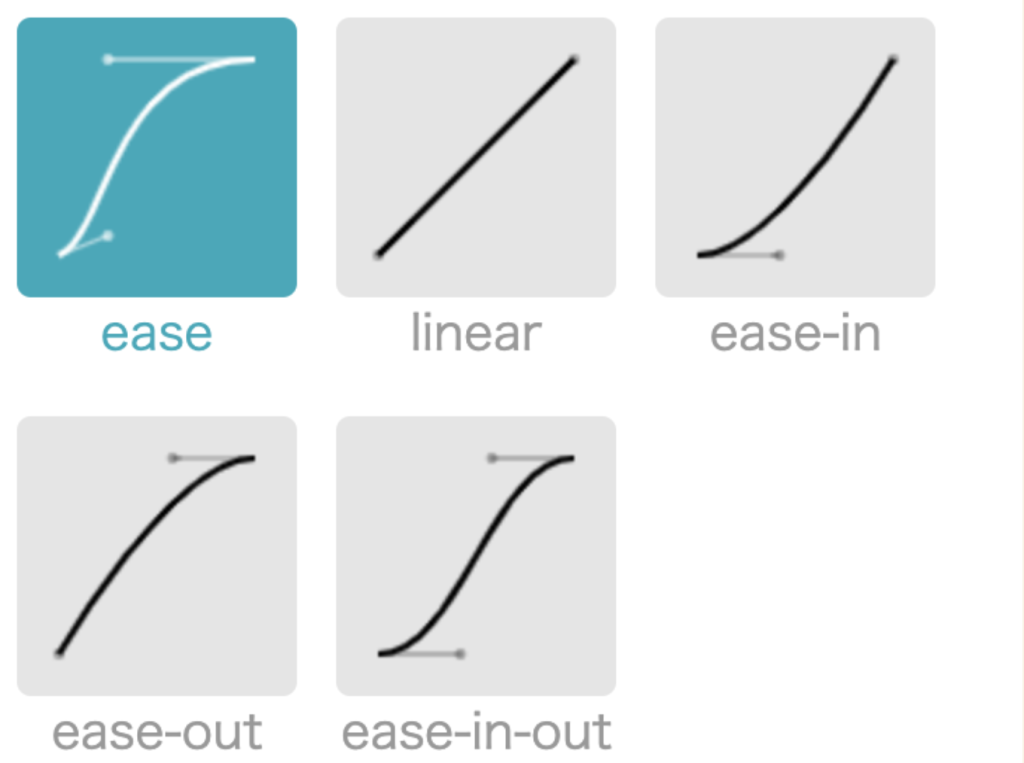
The transition-timing-function dictates how the transition speeds up or slows down while it is being carried out. For example, the transition might begin slowly, then pick up the pace through to the end (otherwise known as ease-in). You might prefer it to ease slowly into the transition, speed up in the middle, then slow down towards the end (ease-in-out).
The transition pace can be imagined as following a curve, where it flattens as the pace slows, and inclines as it speeds up. This is known as the cubic bezier.
An example of a simple transition
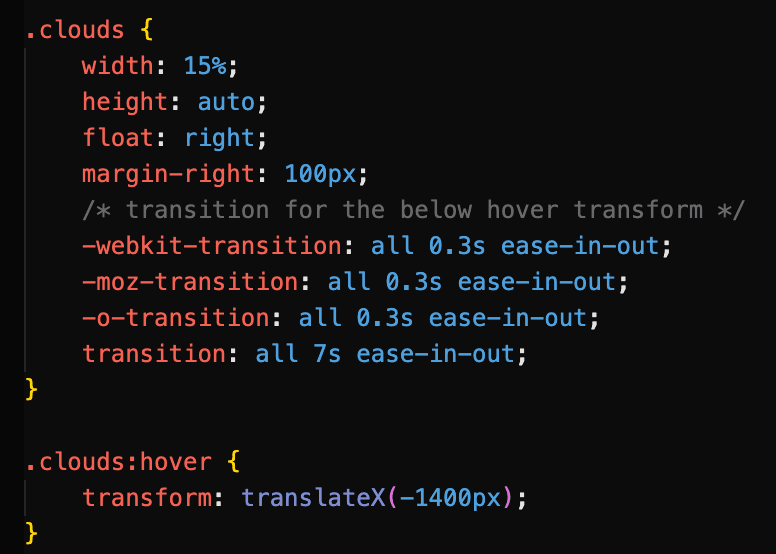
In this little animation of a car driving along a road, perhaps we want to move that cloud slowly to the left when we hover over it, just to give an impression of some extra movement. We would need to perform a transform on it that translates it on its x axis.
Don’t worry about all those strange -webkit prefixes just yet. We’ll get to them.
Here we use the transition property to specify that the cloud should move horizontally by 1400px over a duration of 7 seconds. Using ease-in-out, the cloud starts off slowly when we hover over it, builds momentum as it moves to the left, then slows down towards the end of the transition. Note that the transition is applied to the cloud image itself, while the transform property belongs with the triggering event (in this case, .clouds:hover).
Luckily, CSS transitions are supported by most modern web browsers. That said, the level of support may vary depending on the version of the browser, and some older browsers may not support certain CSS animation features. As a general rule, we should not expect to encounter any issues with browser versions released after 2013. To check which browsers support transitions, you can refer to online resources such as CanIUse.com, which gives comprehensive information on the support for various CSS features across different web browsers, including version numbers and any known issues or limitations.
You might have spotted some vendor prefixes in our hovering cloud example code above. Just on the off-chance that someone views your site in an older browser, you can use vendor prefixes in your transitions to ensure that they will run. We can also let someone else do the hard work for us by heading to autoprefixer.github.io, which parses our CSS and generates the vendor prefixes we need to include in our code.
Autoprefixer can do all the heavy lifting for us.
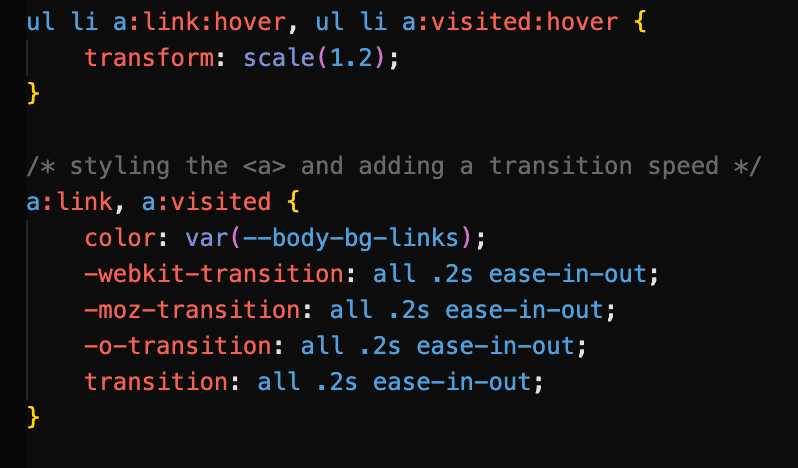
Here’s an example of a transition that uses vendor prefixes to support older browsers. Each link icon has a transform: scale() on hover applied to it with a transition:
These prefixes cover older versions of Safari, Firefox, and Opera respectively. Note that the ‘plain’ transition goes last in the cascade.
Keyframes can be considered animation ‘proper’; they do not need to rely on a user interaction to execute, and can run a certain number of times or even infinitely if desired. Keyframes can dictate exactly how an element’s state changes, and you can explicitly express not just the beginning and end points of the animation, but any part of it in between. Keyframes can be used in conjunction with transforms to produce a variety of effects.
Once the keyframes have been defined, the animation property that references the keyframes can be applied directly to the element you would like to animate. It is easiest to think of the keyframes as an animation ‘script’ that can then be referenced where it is needed.
The syntax for keyframe animations is made up of two parts:
Part 1:Defining the keyframes
@keyframes name-of-animation {
0% { opacity: 0; }
20% { opacity: 1; }
80% { opacity: 0; }
100% { opacity: 1; }
}
After naming our animation, we can define exactly what happens in the animation using percentages, with 0% denoting the start of the animation and 100% signifying the end. In this case, the element’s opacity will change in intervals.
We are not limited to percentages, however, and can simply use the from and to keywords to define the start and end of the animation, as we see in this animation named whoosh that uses transform: translate() to move an element to the left.
@keyframes whoosh {
from {transform: translateX(0) }
to {transform: translateX(-400) } }
Part 2:Calling the animation
.animate-this-element {
animation: name-of-animation 5s infinite;
}
The animation property is then used on the target element to call the defined keyframes and change the state of the element as desired. Above, shorthand has been used to reference the animation name, the animation’s duration, and the number of times the animation will run. In full, the animation properties include:
For efficiency, it is a good idea to use shorthand animation properties. They should also look rather familiar, as they are very similar to transition properties.
animation-name (required) – the name of the animation as specified in the keyframes
animation-duration(required) – usually given in seconds
animation-timing-function – options include ease, ease-in, linear, and all the timing-function values we have already encountered with transitions
animation-iteration-count – how many times the animation should repeat. This can be a number or set to infinite
animation-direction – this defines whether the animation plays forward (normal), backwards (reverse), or back and forth (alternate). You can also start the animation from the end with alternate-reverse.
A simple example of a keyframe animation
Let’s drive our car from earlier on.
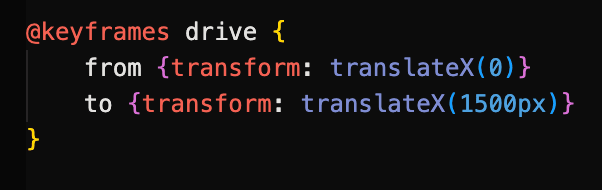
We begin by defining our keyframes. The car is a PNG image that will move from the left to the right of the page by 1500px. We can use from and to to do this:
The animation is then called on the car element.
The animation will last for 5 seconds and run infinitely on a loop.
Combining multiple transform properties with keyframe animations
We can combine transforms to create more complex and dynamic effects. In the example below, a sense of movement and perspective is gained in our desert highway scene by combining scale and translate on elements. As they approach the ‘camera’ and get closer, their sizes increase.
The white road marking is moved to the bottom of the page with translateY, and it is scaled up over time. This gives the impression of driving from a first-person perspective.
When we call the animation on our .lines element, we set it to run at a steady pace for 2 seconds with linear on an infinite loop.
Combining multiple transforms can produce a variety of effects.
SVG elements (Scalable Vector Graphics) are an increasingly popular choice for adding movement to web pages, and can be used with CSS to make simple animations. They can also be animated with the XML language SMIL as well as JavaScript to create more complex animations. However, it would be wise to use SVG sparingly when animating due to poor browser support. Indeed, it is a good idea to consider fallback techniques.
CSS fallback for SVG
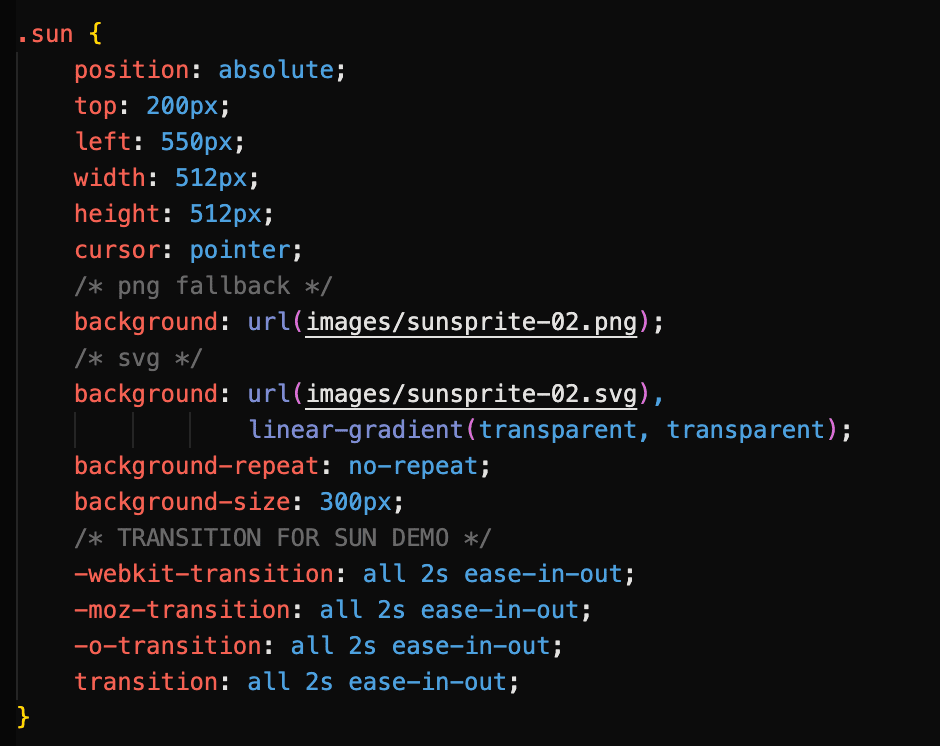
In our desert scene animation, the sun is a SVG sprite that changes colour when clicked and hovered upon, using a flipbook-like mechanic where three sun images are combined. However, if the user’s web browser does not support SVG, the animation will not work.
The sprite changes position as the user interacts with it.
As a fallback, we have set a PNG of the sprite image just before the SVG version in the cascade. This way, the sun will still appear and work as expected, even if an older browser is being used.
More on CSS Animation Fallbacks
There are several types of CSS fallbacks that can be used for animations to ensure that the animation is still presentable and works as expected, even if the user’s browser doesn’t support the animation effect.
Here are some common types of CSS fallbacks used for animations:
Static fallbacks: These are simple styles that are applied to the element if the animation is not supported. For example, if you have a CSS animation that rotates an element, you might apply a transform: none property to the element as a static fallback so that it still looks good and is positioned correctly even if the rotation effect is not supported.
Feature detection: One way to provide a fallback is to use feature detection to determine whether a particular CSS animation effect is supported by the user’s browser. If it is not, you can use a different animation effect or a static fallback instead. This approach requires some additional coding, but can help ensure that your website works as expected for all users.
Progressive enhancement: Another approach is to use progressive enhancement, where you start with a simple, static design that works for all users, and then add more complex animation effects using CSS and JavaScript for users with newer browsers that support these features.
By using these types of fallbacks, you can ensure that your animations still look presentable and work as expected, even if some users are not able to see the full animation effect. This can help improve the accessibility and usability of your website for a wider range of users.
Things to bear in mind when animating
It’s important to remember that by providing fallbacks, you can ensure that your website is still usable and accessible for all users, regardless of their browser or device.
Next, we may choose to (and probably should) make use of theprefers-reduced-motion media query in our CSS to detect whether users have opted for reduced animation in their accessibility preferences. Many users suffer from motion disorders and other sensory conditions, and we need to account for them in our design.
Branding and Visual Design: how will your brand express its mission?
In my research for my proposed website, I determined that the users of my site are primarily:
women aged 35-44
looking for a creative outlet
keen to craft as a means of alleviating stress
Furthermore, these users may:
have little free time
be unsure of how to get started
have varying experience levels and budgets
These concepts will factor heavily into the visual design and content of my website. As explored in my Commodity Crit, the site content will need to include:
concise video tutorials with audio
clear written instructions in tutorials
a section on safety
information on where materials can be sourced, as well as their cost
An about section that gives some insight into the project’s concept and mission
Tone of language
Authenticity of tone
When writing content, it is important to strive to arrive at the ‘truth’. To clarify, there is a difference between writing what the author thinks sounds good, or what they think the reader expects to hear, as opposed to writing what actually needs to be said. This can arise if the author is overly influenced by cognate site content, and instead of searching for their own voice that fits their site mission, chooses to imitate what has already been said, regardless of whether or not it is relevant. I will therefore not look for inspiration from cognate sites when considering the tone of my website.
During my research for the project, I interacted with the Resin community on Reddit to find out what drew them to the craft. The replies were open, warm, and helpful. Some gave very detailed replies and were not afraid of opening up about their personal circumstances. The tone was therefore friendly and informal, but often struck more sombre notes as they disclosed more distressing reasons for needing to find a creative outlet. Several users also mentioned that they found it difficult to know where to start.
Setting the tone of language in my website is therefore potentially challenging in that it needs to bear in mind that users need to find information quickly, but also feel welcomed and ‘safe’ in introducing them to a craft that could possibly seem overwhelming for beginners. This means that the tone needs to be simultaneously concise and minimal while being warm and friendly in tone.
The focus on the therapeutic side of learning a craft also means that I would like to avoid using overly excitable, bubbly language, such as the use (or overuse) of exclamation marks and emphasis including uppercase ‘shouting’, which can serve as a distraction and trivialise the reasons that led to the user wanting to learn to make resin. Instead, the site should use soothing, friendly language. The underlying tone can be summarised as:
“Let’s have a nice sit down and make some lovely things together.”
Visual Design
To begin the process of establishing a brand identity, I started by brainstorming words that could be associated with the site’s content and mission.
Calming, therapeutic words:
tranquility
lagoon
oasis
azure
serene
cure
therapy
heal
raindrop
Artistic, crafty words:
create
curate
inspire
craft
canvas
pour
Name
cure8:
the concept of therapy and healing
the resin curing process
curate – appealing to those looking for artistic projects
8 – 5 mins of mixing, 3 mins of pouring, arranging, no video tut longer than 8 mins
Initially I had come up with resin8, but this was unfortunately taken by a resin e-commerce site. However, cure8 combines the idea of therapy and art, as well as the short time one can spend on the craft.
Colour
From these words (particularly the ‘therapeutic’ words), it is possible to draw connotations. In regard to colour, the words bring up ideas of cool, relaxing blues and turquoises reminiscent of the sea, or perhaps a swimming pool. These would contrast well against a cool, off-white background for a simple, minimalistic feel.
Next, I explored cognate sites to see if there were any commonalities in their colour schemes. I noted that resin8.co.uk uses a teal colour for its logo, while houseofresin.co.uk uses a similar shade for its headings. Indeed, there seems to be an existing connotation between resin art and the colour blue, or more specifically turquoises and teals. Furthermore, the dominant recurring colours in search results for ‘resin’ are shades of blue and turquoise.
A closer inspection of the resin8.co.uk site shows that there is a lot of red on banners announcing item sales, as well as confetti imagery and uppercase lettering. The result is eye-catching and loud, but highlights the site’s primary mission of being an e-commerce site. Red, with its connotations of aggression and anger, would not be suited to a site that promotes resincraft as a therapeutic exercise.
However, to prevent the turquoise and whites from looking too clinical and related to healthcare (such as the now defunct Theranos website), the turquoise should be offset by a contrasting, warm colour. Complementary colours for turquoise include deep reds and burnt oranges, but as established, these can appear alarming and subtract from the calm tone. It would be therefore worth considering a lighter shade of ochre or orange, perhaps reminiscent of sunshine and positivity. This shade could be used lightly throughout the site.
Type
As my users will most likely be busy people looking for clear guidance on how to start making resin, fonts for the site should be clear, easily scannable and simple. I therefore propose to use a sans-serif font for both headers and body text. There will certainly be no more than two font families on the site. I would like such fonts to be more rounded rather than angular to keep the theme of being soothing and calming, and not ‘edgy’. The Google Font Paytone One, with its thick, bold characters may suit this task, but Archivo Black might be easier for those in a hurry to skim-read due to its larger counters, making each letter more distinctive.
Information Architecture
The website structure will be simple and scaled down, primarily so that new crafters are not overwhelmed by too many options. The pages will consist of:
Home – the landing page
Getting Started – a guide on what equipment to buy, how a workstation should be set up
Tutorials (with a dropdown for each tutorial page) – video with text instructions beneath
Safety – safety precautions for working with resin and recommended gear/measures
About – describing the site’s mission
Layout
Due to user time constraints, I plan to take a minimalistic approach to the site layout. Users should not be overwhelmed by choice, and as such will not be presented with too many navigation options.
The homepage would potentially take a full page spread format, with the navigation options clearly grouped together in the centre. This helps guide the user to the exact content they need.
Other pages, such as the tutorial pages, would take on a more conventional design pattern, with a top and footer navigation. As there will be minimal nav options, I would prefer not to use a collapsible hamburger menu for smaller viewports, and let users directly see their options as soon as they arrive on the page.
Imagery and Iconography
Starting with the concept of art as therapy, I am interested in using images associated with healthcare as part of my imagery. Glass apothecary jars/Florence Flasks, as seen in chemists of yesteryear, might suit this idea. With their jewel-like appearance, these multicoloured jars of coloured water are also reminiscent of what can be created with resin itself. It would therefore be interesting to see if this could be incorporated into the logo.
A turquoise wave would also be an interesting addition, perhaps used to separate the footer. This would fit into the thematic ideas of the ocean explored during my word association exercise.
Icons that denote each page of the site in the navbar would need to be instantly recognisable to users scanning through quickly to view the site content. These will be created with SVGs.
My site will be aimed at people looking to start a new craft and looking for guidance on the subject of resin. Furthermore, the site may serve as an inspiration guide for those who are not necessarily new to the craft, but looking for ideas for new projects.
During the research for my Business and Cultural Context Crit, I discovered that the majority of crafters are women aged between 35-44, although this age range is gradually decreasing. I therefore believe the main target audience for my website to be older millennial women looking to find new creative pursuits. However, the website will aim to be as inclusive as possible, and should still be equally functional to anyone interested in learning more about resin-craft.
User persona: what kind of person are you planning this site for?
When embarking on my research for the User Experience Design module, I decided to reach out to resin crafters directly in order to build more of an understanding of who they were. For this I opted to conduct a Q&A on the Resin subreddit, where I asked the group what drew them to the craft, as well as what might frustrate them about the medium. However, I noticed that the community was not particularly active, with an average of 0-3 replies on each post. I was therefore not sure if I would receive many replies. However, in a 24-hour period I received over 15 replies to my initial question. Some of these answers were deeply personal when giving their reasons for starting to make resin, and the reasons differed greatly. I noted that recurring reasons included:
a need for a creative outlet
dealing with grief
alleviating stress
Furthermore, many of the replies seem to reflect my projected demographic; for example, many appeared to come from women. The pain points they listed for resin-craft include:
safety risks
price of materials
identifying the best tools for use
mess/space
As Youtube was cited as a common resource in my Reddit Q&A, I decided to pursue further research both in order to flesh out my user profiles further and also help refine what my content should include. I gathered user comments from resin-craft Youtube tutorials, being sure to include videos aimed at both complete beginners and more advanced crafters. The comments mainly consist of feedback on the video content, as well as troubleshooting issues with users’ own projects. From their feedback, it became clear that users:
preferred content that was to the point with no ‘babble’
wanted clear information on where to source crafting materials
preferred voice direction over distracting background music
wanted clear, step-by-step instructions
It was at this point I felt I could create user personas based on the Redditors I had interacted with. These user profiles are amalgamations of the responses I received from the Reddit community, with similar circumstances and motivations. They also share the same pain points as both the Reddit and Youtube communities. Furthermore, just as the Reddit community does, these user personas use a variety of influences in locating information on resin-craft, such as social media, online search engines, or directly from peers. They can be summarised as below:
Group A/Beth: A 28-year-old busy professional looking for a creative outlet. Pain points include time-consumption and difficulty level
Group B/Caroline: A recently bereaved 36-year-old looking for inspiration for crafting time with her partner. Pain points include cost and locating of materials
Group C/Sam: a 41-year-old stay-at-home mother eager to start a craft business from home. Pain points include time consumption, level of focus required
Group D/Deborah: a 48-year-old gardener recovering from illness who would like to make use of leftover flowers. Pain points include concerns about safety, clarity of instruction
User journeys: how will your site fit into real life scenarios?
At this point it is worth considering how my users would be most likely to access my site. More than one Reddit response stated that they looked for tutorials on Youtube when they started learning the craft. It would therefore make sense to create a Youtube channel for users to browse as a first point of call that would then link to my site for additional information and resources. The type of device used to access the site is also worth considering. For example, one of my personas is looking to start a business while juggling duties at home. They may not have time to sit down at a desktop computer to do their research, and therefore might choose to access the site via mobile or tablet.
Depending on each user, the user journey might look a little different. When plotting out user journeys, I bore my user personas, as well as their influences, user stories, and job stories in mind:
Group A/Beth: views resin-craft content on Instagram → follows tutorials on Youtube → navigates to my website from there → checks the length of the tutorials in the tutorial section to see if they are long
Group B/Caroline: views my tutorials on Youtube → active on Reddit community → locates site and navigates to the tutorials to see if materials are listed/easily sourced and affordable, as well as if there are plenty of creative ideas
Group C/Sam: has been trying to follow online courses online but finds they require a lot of time and deep focus → searches for alternatives → finds my site and navigates to tutorials to see if instructions are clear/have audio directions
Group D/Deborah: hears about resin-craft through friends → watches some Youtube tutorials → searches online for more information → finds my site and navigates to safety section for guidance
Content strategy: what kind of content will support the site’s mission and benefit its users?
From the above scenarios, it is clear that due to my users’ concerns over time-constraints, budget, difficulty levels, safety, and need for inspiration, my site must include:
video tutorials with audio for those who might become distracted
concise videos with no ‘filler’ content/’babbling’
clear instructions
a section on safety that is easy to find
clear information on where materials can be sourced
cost of materials for budgeters
The information architecture must also be simple and easy to navigate. It would be beneficial to use a stripped-back, minimal approach to the design to help facilitate this, with tutorials, setup tips and safety precautions all easily accessible from the home screen. Including quick links in the footer may also be beneficial to prevent unnecessary scrolling.
As progress on my website continues to evolve, it would be in my interests to refer back to this Commodity Crit to ensure I am fulfilling the user’s needs, as well as solving their problems.
When deciding on a topic for my Major Project website, I was encouraged to choose a theme that aligned with my interests. This is why I chose to make a website based around resin craft; it is an engrossing, creative subject that is relatively easy to fit around my studies. However, while my own involvement in the craft is a fine starting point, it should by all means not be the end point in terms of how I approach the website’s content and functionality.
As the user experience consulting firm Neil Nelson Group points out, it is important to remember that “you are not the user,” no matter how involved with the product’s subject matter the designer might be. To assume that my users share my beliefs and behaviour simply because I also make resin would create a false-consensus effect that overestimates the similarity between would-be users and myself. Just as harmful would be any ideas on my part that only those vastly different to myself would make decisions different to my own. Ultimately, one cannot solve user problems without getting to know the user first.
It is integral, then, to implement a user-centred approach to the planning of my website. This should focus on the user through all stages of development, from planning to the end product. The user should be involved in each stage of the design process where possible to inform any decisions I make.
When deciding on an approach to user research and implementing UX principles, it is important to note that there is no ‘standard’ set of steps to follow, as many organisations have slightly different steps and methodologies when working with users. However, they share essential components, such as user research, problem definition, and an iterative process where it might be necessary to retrace steps if ideas transpire to be flawed, or most importantly, if a user problem is not solved. My steps, adapted from the UX Design Institute, recent workshops taken with user-centred designers Chris How and Steph Troeth, and Adobe’s educational materials on the subject, may serve as a guiding process and are broken down as follows:
The User-Centered Design Process
Product Definition
In order to define what a product might consist of, designers must first scope the lay of the land in terms of their chosen subject. When building any product, it is important to understand what Adobe refers to as “its context for existence.” I would also add to this that designers must justify the product’s existence in the first place. My own justification for a website on resin craft was largely borne from my research for my Major Project’s Business and Cultural Context Crit Session, where I established a correlation between crafts and mental health benefits. As I had also discovered that many UK citizens do not feel they have much free time, I decided to focus on resin craft due to its relative time-efficiency.
Before doing any initial brainstorming of my own, my first approach to roughly defining my website was to look at the existing market. Researching cognate sites helped me identify potential problems that users might face early on. For example, tutorials were often time-consuming, which would not be helpful to busy users.
During this product definition research stage, it is also possible to gain a rough idea of the demographics of potential users. In the case of crafting statistics, I learned that the most likely target audience would be women aged 35-44, although this age range is decreasing over time.
The few existing resin craft websites are often vendors of materials, and their tutorials’ links to product pages mean that there is a monetary motive behind their existence. Tutorials and courses are often long and overly technical, which may put off some new to the craft suffering from time constraints, or simply looking for a new hobby or therapeutic outlet. Youtube tutorials are often meandering with unclear instructions. As such, I decided my initial product definition would be a website that:
is concise and informative
is primarily aimed at women
is not looking to ‘sell’ anything
At this stage, I was aware that the context and justification for the website might change as my research develops, and that the early product definition was just a starting guideline.
2. Research
In her User Research Fundamentals workshop, Troeth stressed the importance of thinking about real people. However, as resin is a fairly obscure craft, I did not think it would be beneficial to conduct in-person research with my immediate peer groups. I decided that the best way to progress with my research would be to look at online communities that share an interest in resin craft.
After roughly defining my website, I set out some research objectives in order to gain a sense of how my website could add value and solve the user’s problems. I did this by drafting some ‘W’ questions:
Why did the user start working with resin?
What does the user find frustrating about the medium?
How does the user respond to resin-related content online?
In her presentation, Troeth also discusses the craft of questions, and emphasised Erika Hall’s assertion that the designer must know what decisions questions will inform before they are asked. I knew that the questions I asked would influence my website’s content, as well as help me understand the user further. I chose to post on a Reddit forum that focused on resin craft, asking the community why they started working with resin, and what put them off learning. Through identifying myself as a novice crafter, I could identify my own frustrations as a means of encouraging the community to share their own stories.
Asking user communities ‘W’ questions
To gain additional insight into users’ needs and problems, I gathered user comments from several resin tutorials on Youtube. For this task I made sure to select from a mix of content aimed at beginners and more experienced crafters to see if there would be any commonalities, as I do not want my website to exclude potential users based on experience level.
As I progress in my research I may choose to conduct individual interviews online with participants from the Reddit community. These would consist of open-ended questions (why? when? how?) to find out more about their behaviour and needs. As some of the responses I received to my initial Reddit post were sensitive and quite personal in nature, I would take interview ethics into consideration and remind participants that they can stop the interview at any time.
3. Analysis
My research enabled me to begin the process of moving from “what” users say to thinking more deeply about “why” they say it. Through the detailed responses I received in the r/resin community, I learned what inspired people to take up the craft, as well as what their pain points were from the Youtube tutorials. As a lot of the responses were quite in depth and revealed a lot about the participants’ characters and motivations, I was able to begin the process of visualising my findings. My next task was to therefore create user personas that will serve as realistic representations of my target audience for reference. I was able to create four user groups, each with different circumstances, goals, and frustrations.
Example of a potential user persona
From the user profiles I was able to construct an empathy map to build a fuller understanding of my potential audience. By examining their feelings, overall goals, influences, and pains, I can begin the process of defining the problem to solve.
User stories are also a valuable tool for establishing why users want to achieve certain goals. They may take the form of a simple persona → need → purpose sentence as follows:
As a { user role / persona }
I need to { do what I need to do }
in order to { accomplish goal }
Essentially, user stories can help designers boil down their users’ motives to a ‘truth’ that must always be taken into account when designing. Another effective empathy technique is to create job stories, where the designer steps into the user’s shoes to provide additional context to their situation:
When {situation}
I want to {motivation}
so that I can {expected outcome}
From here, it is possible to begin defining the problem that needs to be solved. I can look at the various issues the user groups might face and determine how best to tackle them.
4. Synthesis & Design
Having analysed my findings and drawn conclusions from it, I will next need to begin the process of synthesising it into the design and content of my website. There are many ideation techniques, but one particularly effective starting method proposed by Chris How is to brainstorm ‘The Worst Idea Possible.’ For example, if my Group A user’s pain point is that online tutorials are often overly-complicated and inaccessible for beginners, then I might propose a long series of video tutorials with ridiculously difficult quizzes at the end of each module. By pointing out what would not work, I can then begin to form ideas for what the user actually needs.
It is at this stage that I would form a list of “How might we…” questions based on the user pain points. For the above pain point, for example, my question might be phrased as:
“How might we make sure tutorials on the website are clear and easy for busy people to follow?”
Having decided which content should be included, I would then create possible UI Flow sketches to begin visualising the information architecture and user journey. While doing this, I will consult pattern libraries to see if there are any potential UI problems I can address before I begin wireframing and prototyping with Figma. For example, some of my users suffer from time constraints, and as such they should be able to find the content they need quickly and effortlessly. It is at this point I will begin to narrow down what Andy Clarke refers to as “design atmosphere” concepts, and create style tiles and element collages that offer glimpses of my planned colour, type, and other interface elements.
It is crucial to develop a timeline for my content creation as soon as possible. Establishing the right tone for it early on will therefore be beneficial. I noted that the warm, welcoming tone of the Reddit community was very useful to myself as a beginner of resin craft who might otherwise feel daunted; I plan to use a similar tone in my own content. In the interest of connecting with users and presenting a human, genuine tone, I therefore plan to only use images and content created by myself as opposed to stock images, as well as meaningful copy that users can relate to.
5. Validation
Once the prototyping stage has begun, I will begin testing the usability of an early version of the website. Early on, I will use the ‘eat your own dog food’ UX concept by navigating the site on a range of devices to help build empathy for users, who will most likely view the site in a variety of ways. I will then ask course peers to participate in usability studies to collect both quantitive and qualitative data, being sure to define goals through questions such as:
Is the content easy to understand?
Can the user complete a given task effectively?
Users will be given tasks to perform, such as “Find a jewellery tutorial” or “Look up safety guidelines.” Participants will not be given clues on how to do these. Ideally this would take place in a moderated setting and be in-person, as further cues such as body language and mood can be picked up on. Users will be asked to provide qualitative feedback through an open-ended question interview after the test.
I will also create a survey for members of the Reddit community to complete once they have been given the chance to view the site prototype. Questions will be close-ended in order to obtain quantitive user opinions on specific website features. This remote testing has the added advantage of allowing users to interact with the website in their own environments; the context in which the website is intended to be used. I also plan to explore analytics tools to gain further insight into how users interact with the site.
Conclusion
As my research continues to progress and prototyping begins, it is essential to remember that all design ideas are little more than assumptions until they are tested with real people. Whether these people are seasoned resin creators or new to the craft, I should listen to any feedback given and use it to strengthen my website’s design. Once this design is completed and it is time to pitch it, it is my job to find the story of the work by expressing what the problem is, and exactly how my website solves it.
My Major Project will be a ‘how to’/tutorial site on resincraft for beginners. As well as step-by-step tutorials, it will offer starting information for anyone new to the craft, including a guide to the tools required. The site will also offer inspiration for those looking for ideas for their next projects.
What problem does my project solve?
It should come as little surprise to hear that there is a connection between craft activities and mental health. According to mentalhealth.org.uk, there were 8.2 million cases of anxiety in the UK in 2013. Furthermore, in England, women are almost twice as likely to be diagnosed with anxiety disorders as men.
The Crafts Council website refers to a 2019 BBC survey that came to the conclusion that creative endeavours can “make you happier.” Over 75% of the 50,000 participants for the BBC Arts Great British Creativity Test stated that creativity could help reduce stress and anxiety, with almost a quarter naming some manner of craft practice as their favourite activity.
When I started learning to crochet, I too found it to be a great stress-killer. Concentrating on counting the stitches, when coupled with a good Spotify playlist, helped me practise a kind of ‘mindfulness’ that tuned out the outside world.
However, my urge to take up a craft of some description was not borne out of a need to quell anxiety, but boredom. My job was relatively unfulfilling, and certainly lacking much in the way of creativity. Thus crochet in the evenings formed an outlet and foil to the tedious daytime. As noted in the BBC survey, 69% of participants used creative outlets as a ‘self-development tool’ to build up self-esteem.
The respite crochet offered me diminished when I began trying to teach myself coding basics in the evenings in my hopes of making a career change. Now when I crocheted, I often felt a nagging sense of guilt that I should be learning to code instead. A crochet project could take hours, days, and in some cases, weeks – time that, in my mind’s eye, could have been spent trying to change my future. I felt I should ‘be productive’ with my free-time, and crochet itself came to become an undeserving source of stress, if done at all.
In the UK, almost 1 in 2 adults feel that they have “very limited” free time for themselves during the working week, according to a survey of 1000 participants reported on the HR News website. With housework, personal admin, and food prep taking up a busy worker’s evening, it is little wonder some may feel they have no time to sit and do crafts, particular in hourly stretches.
However, this does not mean that people need to give up on learning to make things. BBC Arts editor Lamia Dabboussy said of the BBC survey: “Lots of us lead increasingly busy lives and this research shows that even a small amount of time spent on creative pursuits can really make a difference.”
A craft does not have to take over all of one’s free time. My proposed site aims to introduce busy people to a creative outlet that does not take too much out of their day. Unlike time-consuming hobbies such as knitting or crochet, resin-making can be done in mere minutes, with the majority of time going into curing. While some may argue this removes the therapeutic aspect of creation, I firmly believe that the acts of choosing and mixing colours, preparing and measuring liquid resin, and selecting extra visual touches allows the creator to give their full attention to a project and immerse themselves. They also have the added bonus of reassurance that they will not lose their evening while doing it, which could otherwise put them off trying a craft at all. Ultimately, crafters are able to create beautiful objects without feeling pressured by time constraints.
The website will serve as a general starting point for beginners. It will introduce crafters to the tools they will need to get started, as well as provide tutorials for particular aspects of the craft, such as drilling, embedding, setting jump rings, and do’s and don’ts. It will also include tutorials for particular types of projects, such as working with natural objects. These tutorials will be short and concise. Any videos will be no longer than five minutes, due to the site’s emphasis on time constraints.
Who is my website for? Who does my project help?
According to Wunderlabel.com, a website that examines online craft sale trends, around 87% of sellers on the craft trading site Etsy are women. Furthermore, the average age of sellers is 39. This is further explored by the Anthony Thomas Agency, who writes in a blog post that the average age of crafters is 35-44, though this age range is decreasing over time. They also point out that the majority are women who live in homes with 2.94 people. “In summary, if there is a so-called “average crafter,” that person is likely to be a middle-aged woman with children.” Bearing these figures in mind, my site will be primarily aimed at female older millennials, who are statistically more inclined to pursue a new craft. That said, the site will be just as functional to anyone interested in learning a new hobby, as it is important not to exclude groups when making any website.
How does my project fit into the cultural context? What is its place on the www?
There are numerous resources for learning about resincraft on the web. The site craft-resin.co.uk is particularly comprehensive, with a series of attractive tutorials labelled as ‘courses.’ These courses are fairly in-depth, and are made up of several videos of varying length. Their format is similar to that of Udemy or LinkedIn Learning, and often require the user to complete quizzes to move on to the next component of the course. One tutorial, when all videos are watched back-to-back, is 77 minutes in length. While users with fewer time constraints may feel that such courses are beneficial, others may be put off by these somewhat daunting course durations. Furthermore, the more time they are trawling through quizzes, the less time they actually have to make crafts. I therefore do not believe such sites are an attractive option to my users.
Youtube videos are also becoming more popular for learning resin, and can be immensely helpful. However, there are similar tropes across a lot of Youtube tutorials that I would like to avoid. These include ‘cutesy’ music, as well as introductions that can often feature a lot of ‘waffle.’ Just as I find myself skipping the first few minutes of recipes, crochet, and resin tutorials while the presenter chatters away, I would like to make any instructional material as to the point as possible.
While there are increasing numbers of resin craft tutorials and resources across the web, the majority of them are to be found on sites that sell resin supplies, including https://www.craft-resin.co.uk/. There is no mistaking a monetary motive in the tutorials, which often include links to product pages. While some may find this convenient, the majority of new resin crafters will most likely buy cheap starter kits, which can easily be found on Amazon or Etsy. My website will encourage users to start making projects right away, using the tools they have to hand. Projects will be relatively simple, without the need for elaborate items.
It is therefore my intention to make a concise, informative website that educates busy women on the basics of resin craft. It is as much a website designed for myself as anyone else, both because I am learning the craft myself and because I fall within the target audience’s demographics. In this sense, I plan to curate my own learning for the user, pulled from numerous sources.
This design studio uses black backgrounds with a muted peach shade for its text. This understated look contrasts the brightly coloured animated shapes that gently float across the screen.
These moving shapes recur throughout the website. Their neon shades and random shaping are for the most part not recognisable as any familiar objects. This very much gives the impression that we are looking at a work of design, where thought has been put into every shape, quite possibly beyond the scope of the viewer’s understanding. All we know is that we are looking at the work of designers, with meaning that might elude us due to their seeming complexity.
For call to action sections, such as the contact page, bright colours are taken away and replaced with a more conventional photo of a team member.
This wine producer eschews the understated look of most product pages, and instead is an explosion of layered colours and images.
A warm shade of yellow is reminiscent of sunlight and hazy weather, while the verdant greens remind the user that nature is a central theme of the business.
Black and white Python-esque imagery contrasts with the warm shades of the backgrounds, as well as the tropical, exotic imagery.
When buying online, shoppers have become accustomed to minimalist layouts, few colours, and linear product listings. With highly stylised fonts, as well as slightly psychedelic warm tones and patterns, this site by all means should not ‘work’. Yet it does.
Ree Drummond’s carefully crafted image as a country gal is reflected in her site’s choice of colours. The slightly twee pinks, reds, and blues of the flowers in the header are reminiscent of a country living room, as is the muted green that resembles slightly faded wallpaper.
The background textured yellow would also not look out of place in a Southern drawing room (or kitchen, given that this is predominantly a recipe site). Yellow, as well as being a bright, friendly colour, is often used in fast food logos. According to Stellen Design, yellow is a colour often intended to evoke hunger, as is red. The Pioneer Woman site uses this yellow throughout, as well as the red lettering of the logo and nav links.
In the fashion section, we see a light teal shade that contrasts with red and light coloured flowers, again reminiscent of wallpaper. The colours in this context are feminine and cheery, and while blue is often labelled a cold colour, here it is warm and inviting.
This Massachusetts hotel uses two main fonts throughout. Its header, subheadings and nav links are a bold sans-serif that immediately draws the eye. Note that its call to action (‘Book Now’) is the only colouring.
The heading font is warm, with somewhat rounded edges and a use of caps that seem reminiscent of the Tintin book series. This gives a sense of adventure, and with its almost khaki background colour, seems to harken to a time of colonial exploration, safaris, and travels of yesteryear.
The site chooses to use a monospace font for its secondary typeface. This is a somewhat bold move, as its fine, small lettering threatens to be easily ignored. However, it serves to contrast with the bold headers, and is not eclipsed by them. It seems like text suited to a mission brief, hastily typed out on a typewriter. This works well with the site’s vintage aesthetic, and a sense of adventure in unknown lands.
The New Yorker (Desktop view)
Established in 1925, The New Yorker has not strayed far from its origins in terms of type. It uses characteristic headers with extremely wide counters, giving a rounded appearance to the characters. Serifs are ornate but understated. Overall, there is an art deco, Roaring Twenties feel to the headings.
When an article is opened, there is a lot of whitespace surrounding the headline. This makes it very clear to the reader which article they are currently reading.
The New Yorker makes the decision to use all uppercase on its headlines, dates, and its logo. While this may create difficulty for some readers due to all of the characters appearing on the same level, the use of white space around these areas helps to prevent cluttering and confusion.
A much more ‘web-friendly’ bold sans-serif is used for the author’s name and date, while the byline is in italics. The different weights and styling help the reader to distinguish these pieces of information from each other.
Interestingly, The New Yorker chooses to use serifs for its article text, as well as drop caps for its opening line. In this way, the text closely mimics that of a printed article. Line height also prevents the text from becoming too blocky and difficult to read on phones, tablets, and desktops. This imitation of the printed word gives the reader the sense that they are indeed reading a magazine, and that they are not losing the pleasurable aesthetics of print simply because they have opted to use a screen.
9 Hours (Mobile view)
9 Hours is a Japanese capsule hotel, and its website has been fully translated into English from the original Japanese.
With the exception of the logo, where the words ‘nine hours’ are slightly less weighty than the ‘9h’ in bold, this page chooses to use the same bold typeface throughout the site.
This minimalist approach to type is symbolic of the hotel itself, which makes much of “stripping away the unnecessary.” The site’s use of pictographs and icons in conjunction with text further gives the reader the feel that text has been chosen carefully.
Subheadings are bolder than body text to differentiate between the amenities. Key information such as check-in times have slightly wider character spacing/kerning than the rest of the body text to set it apart and draw attention to it.
Sections of information are arranged into small blocks or pods, almost as if they too are capsules themselves.
Study – read recommended texts, watch videos and tutorials
Reflect – make notes based on studies. Write “what I learned” blog posts
Practice – complete project tasks to practise what you have learned. Seek support if needed
Feedback – make notes on how to improve
HTML points to bear in mind
<br> and <hr> – to use or not to use? They are used for presentational purposes. If so, then why bother using them if you can then just style in CSS (say by creating border-bottom lines?). Best not to use.
Don’t necessarily need to indent the <head> and <body>, but it’s a good idea for ease of viewing.
NEVER add anything to your code that you don’t understand.
Always make alt text as clear for screen readers as possible.
NO inline CSS or <head> <style> CSS!
By default an img should always have a height and a width. But are they considered presentational and therefore irrelevant? However, height and width has a specific function. The browser then knows how much space to reserve for the image. Otherwise, all the text jiggles about as the image loads, which is very annoying.
On organisation – it doesn’t matter how you organise your folders, as long as it is very clear to you.
For file and folder names – we use hyphens, not spaces or underscores.
Here’s the best suggested practice for beginners:
CONTENT OUT
Do NOT use lorem ipsum. Remember we build from the “content out”. How does the content influence the design? Layout has to be meaningful. We do not design first.
“Content precedes design. Design in the absence of content is not design, it’s decoration.” Jeffrey Zeldman
Who are you designing for? Remember it’s not about what YOU like. What do people need?
PROTOTYPES
Learn to prototype well using HTML and CSS.
Mockups are no longer the way to do things. They are static. We should go straight from wireframing to prototypes we can interact with. The client should get a real feel for the product straight away.
IDEAS
Do not dismiss the importance of pen and paper. It can be an effective tool for brainstorming.
We should always have evidence of the design process. The tools are not important.
Write down your ideas. Even if they are stupid to you.
Affinity Photo and other programmes are alternatives to Adobe. Figma and Sketch are other alternatives.
Ultimately the choice is software is no longer important. There are many choices, so use what you have access to. Just get on with it.
FILE SHARING AND BACKUPS
More than one backup – on your machine, an external drive, and also online.
CarbonCopyCloner is one piece of software that aids backup to an external drive, and SYNC is a tool for online backup. Have now made a SYNC account and uploaded my files to it.
Never rely on a single copy of your work. Set this up ASAP.
Jeffrey Zeldman – Designing with Web Standards is a hugely significant book. Jeremy Keith has put the ideas into easier to understand terminology, but this book is still worth reading for context.
Don’t forget A List Apart articles.
Check out work by Eric Meyer and his writings on CSS.
Take a look at Dave Shea’s Zen Garden. Look at how different the CSS can make a site look despite the HTML remaining the same.
Remember you have access to Linkedin Learning.
Read as much as you can from the recommended material.
Clear Left – a well-known agency in Brighton. They do internships.