Categories
Design for Web Content Task

Design for Web Content – Good Design II

THREE WEBSITES THAT DISPLAY GOOD DESIGN

  1. Etsy

About: Etsy is an online marketplace where users themselves are the merchants. The content is ever-changing, and users are encouraged to review any purchases they make.

The homepage

Upon entering the homepage, the eye is drawn to the large searchbar at the top of the screen.

The logo is also relatively understated, while the pastel colour theme of the banner is minimal and muted. Aesthetics are not the main focus.

Sub categories at the top are clearly laid out.

The layout makes the user journey clear; most users will have a specific idea of the sort of products they are looking for and either head for the subcategories or the searchbar. Options for browsing more casually are located further down the page, and less of a priority.

Once a search term has been entered

Search results are displayed in a clear grid, with images of the products taking up the most real estate. Only the key information (the information the user is most interested in) is in bold – the rating of the seller and the price. Even the name of each product is not what the eye is drawn to.

The subscribe button

The invitation to subscribe to a mailing list is almost at the bottom of the page. Only those specifically looking for it are likely to see it, and its presence is unobtrusive. There are no pop-ups.

The footer

Hierarchy plays a role in the layout, with information less relevant to the user displayed in the footer.

The bottom of the page, where more ‘corporate’ information can be found, has a completely different aesthetic to the higher parts of the page. It is a solid, official blue and very unadorned. It creates a sense of being more business-like. Users looking at this section are more likely to be jobseekers, businesses, or those seeking to make a complaint or report. The overall tone is one of professionalism, which creates a sense of trust.

If the main part of the page is the shop front, then the footer is the back office.

Summary: It is easy for users to look for specific items and quickly assess the information they need. Aesthetics play a smaller role, and mainly the content (products) itself make up the visuals on the page. Etsy’s corporate presence is minimised on the page in favour of user content.

2. Brent Council

About: Brent Council is a website for residents looking to perform various online tasks and find local information. It was redesigned in 2021/2.
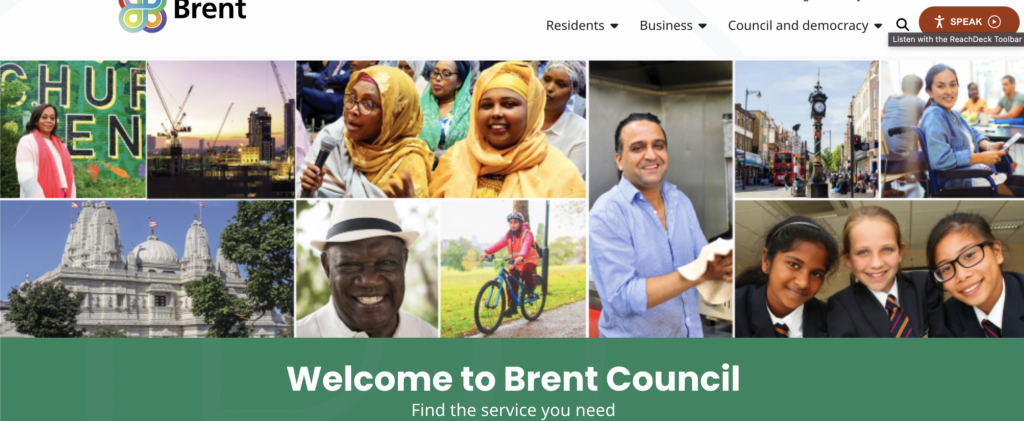
The homepage

Brent Council’s website is relatively unadorned, with little in the way of decoration to it. It uses the additive primary colour green in background blocks. This gives a sense of feeling ‘official’. Its navbar is also very plain, and the navlinks’ dropdown options prevent the navbar from being too cluttered.

Not many options are given upon viewing the homepage; you are either a resident or a business, with an additional option to view the council’s structure. Should a resident navigate to the site in order to find local information, their pathway would be very clear.

A mosaic of local residents imparts the message that the focus is on Brent’s population itself.

Reachdeck toolbar a clear option at the top of the page

The 2011 Census found that around one in seven Brent residents (14%) had a long-term health problem or disability that limited their day-to day-activities. The inclusion of Reachdeck software clearly placed in the header assists accessibility, with options for text-to-speech and page reading.

Options for residents

Clicking the residents’ option in the navbar opens a list of subcategories that navigate to the relevant page.

Visual subcategories

According to the 2011 census, 37% of the Brent population used a main language other than English – the 2nd highest in England. Around 9% of adults in Brent have poor proficiency in spoken English. The inclusion of an icon grid below the resident subcategories further helps residents determine which section to navigate to.

Further options lower in the residents’ section

Options for residents are further simplified if they scroll past the subcategories; they are presented with a four-part grid made up of keywords. This can help users who might feel overwhelmed or unsure of which section to navigate to, and also those with limited English ability.

News and activities are placed closer to the bottom of the page. Most who log on to the site will have an idea of the action they wish to accomplish, and so more casual browsing is not prioritised.

Summary: Users and any difficulties they might face when using the site are prioritised on the Brent website, with accessibility a clear focus. Pathways are made as clear and short as possible, while any aesthetic visuals on the page are limited to images of the residents themselves.

More on council websites here.

3. Moulin Rouge

About: The landing page for the Moulin Rouge theatre in Paris, which offers dining, live shows, and various experience packages. There is also an online shop.

Homepage when first navigating to the site

Aesthetics play a large role in the website, evident from the animation that plays upon first navigating to the site. This cover screen is fully animated and takes up the entire browser window.

However, this screen can be removed by a prominently placed cancel button on the top right. Once the user is on the page, this animated cover does not repeat. If left alone, the animated cover recedes after a few seconds, revealing the homepage. This prevents aesthetics from encroaching on the functionality of the site.

The navbar

The navbar is minimal, with few options and a call to action button on the right. The call to action button has inverted colours to make it stand out from the navlinks. Interestingly, the logo/homelink is placed in the centre of the navbar, which is a change from the usual left-hand alignment seen on most websites. This may be a matter of aesthetics, in order to showcase the logo while ensuring it is prominently placed for easy navigation.

As the Moulin Rouge is a renowned tourist destination, language options are available via a dropdown menu above the main navbar. However, the site automatically loads in either French or English, depending on the user’s location.

Drop-down menus on the navlinks

Drop-down menus on the navlinks allow for subcategory selection while keeping the header uncluttered.

Booking options page

Booking options and offers are presented via a series of ‘cards’ that the user scrolls down to explore. Each ‘card’ takes up the majority of the browser window in order to fully present its contents. This may be more effective than say, a carousel, as users can quickly scroll up and down between the cards to compare them.

The accompanying images on each card are the only images upon the page. The eye is drawn to these areas and nowhere else.

Unique aspects of each offer are highlighted in red text. While it may be chalked up to being a sales tactic to draw customers in, highlighting key features of each offer helps the user compare the offers faster, perhaps while skim-reading.

Footer

As is often the case with footers, it is mostly stripped down, without the spectacle of the main part of the page. This serves to provide a more ‘official’ tone to more functional information, such as contacts and parking.

The footer also includes some hidden features, such as video links to performances that are not available in the main site. In this way, the user is ‘rewarded’ for scrolling this far.

The most prominent feature of the footer is the call to action section, where the newsletter subscription and social media buttons are the only sources of colour. Furthermore, information on hearing aid assistance is highlighted in bold.

Summary: The Moulin Rouge places a lot of emphasis on its visuals, as is to be expected due to the establishment’s reputation. However, these aesthetic touches are minimal and do not eclipse the content of the page. In the case of the offers page, accompanying visuals help guide the eye to key information for the user.

Finally, some food for thought:

“Good web design is a balance between aesthetics and ethics.”

– Elliot Jay Stocks

“…design seeks to negotiate the qualities of the content with the affordances* of the format to produce a cohesive whole greater than the sum of the parts.”

– Frank Chimero

“Indifference towards people and the reality in which they live is actually
the one and only cardinal sin in design.”

– Dieter Rams

“Less is more.”

– Ludwig Mies van der Rohe

Good web design is user-centred. When we build web properties or create web
content, we do it for the user, we do not do it for ourselves and we do not do it for our client.

“In a world where content creation is cheap and 90% of it is crap, we have a
decision to make: do we want to be part of the 90% noise or the 10% signal of the web.”

– Brad Frost

And lastly:

Content over aesthetics – aim for a balance, but content is the key draw overall.

Categories
Design for Web Content Task

Design for Web Content – Good Design I

THREE OBJECTS THAT DISPLAY GOOD DESIGN

What is it?

A crochet hook.

How is it an example of good design?

The hook’s head is thick and solid, making it easy to push through tighter yarn weaves. It is also rounded, making it difficult to snag on the yarn and damage it. Its curve is also relatively open, making it easy to ‘catch’ the yarn on the first try. Immediately after the hook’s head, the ‘neck’ is quite narrow, meaning that that the user can avoid stretching out the yarnwork if necessary by not pushing the hook through too far.

The hook itself is separate from the handle, which is thicker than the hook. Its thickness prevents the hook from slipping through the work by accident when put down. The soft, almost rubber quality of the plastic makes it comfortable to hold for long periods of time. Its matte texture also makes it non-slip, and can be gripped well while working on projects.

The measurement of the hook is also printed on the handle towards the base, where the user is less likely to grip it and therefore rub it off over time. The colour of the handle is also vibrant, making it easy to spot if lost, perhaps under a skein of yarn. The colour also makes the hook easy to identify if bought as part of a multicoloured set, with each colour identifying a different hook size.

What is it?

A bath shelf.

How is it an example of good design?

The shelf unit is extremely simple in its execution. It has no adhesive qualities whatsoever, which makes it very easy to reposition depending on where the bath’s occupant chooses to sit. Gravity and measurements alone are enough to keep it in place.

The choice of wood as the material as opposed to plastic or metals is aesthetically pleasing and creates an overall rustic feel, which might be preferred due to the relaxing connotations of a hot bath. Wood also softens somewhat when wet, which would help prevent damage to the bath itself if knocked out of position, as well as prevent scrapes on the surface.

To prevent the shelf from sliding too far left or right, the central portion of it is set lower than the narrow ‘arms’ of the unit. The unit’s width is also carefully measured to fit the width of varying bath sizes. The curved sections serve to minimise the chance of the unit knocking directly against the bath’s rim. The shelf surface is also enclosed, preventing items from falling into the water below. Its bottom is also slatted, allowing any excess water to drip back through into the bath.

What is it?

A sealing clip.

How is it an example of good design?

It is minimal and unadorned. Its very shape makes it clear what its purpose is, and using it requires very little intuition.

The material is a sturdy plastic, which helps prevent it from losing its shape and therefore its grip on any packaging. Its stiff nature also allows the fastener to audibly snap into place. his serves to reassure the user that their packaging will indeed remain closed. That said, the fact that the product is plastic does allow it a small amount of flexibility, which is important to prevent it from shattering or snapping if a lot of pressure is placed on it. It can therefore be used on thicker or bunched up packaging if needed.

The grooves that run along the back of the fastener prevent it from slipping from the user’s grasp, which is particularly important as the user in most cases would only be using one hand, as the other would most likely be gripping the product they wish to seal.

The clips come in a variety of lengths, and each one is colour-coded. This makes it easy to know which clip to grab if there is a collection of them, perhaps in a disorganised drawer.

The clip is also inexpensive, which is essential as its relatively small size means that it is likely to become lost in a busy kitchen.

Categories
Design for Web Content General

Design for Web Content – What is Web Design?

Resources for this course

What makes a good website?

  • Responsive websites will be pushed higher up on search engines. Think of it as Google rewarding for good practice.
  • Content
  • Accessibility
  • SEO – fresh quality content that is regularly updated will get better search engine results
  • Content over aesthetics – aim for a balance, but content is the key draw overall

What makes a bad website?

  • long loading times (slow server hosts, large imgs, etc.)
  • poor quality content, signups
  • poor aesthetics, different fonts
  • unclear layouts, unpredictable navs
  • long user journey
  • unresponsive

A little bit on the history of the web (as read in Jeremy Keith’s book Resilient Web Design)

  • the Mosaic graphical browser was released in 1993 and was the first to contain images.
  • The beauty of the web – it is backwards-compatible. Content from 1989 can be viewed today.

Growth of the Web

  • The number of domain names is falling in recent years. There are so many domain names that they can’t be snapped up and sold on for a profit. For example, there isn’t just .com, there’s now .blue, .pizza etc.
  • Nobody should be excluded from the web. However, we can see that not every continent has equal access to the web.

Who coordinates Web technologies?

We need an independent org to moderate the web and set the rules. We have Web Standards that set the rules, created by a consortium known as WWWC (World Wide Web Consortium) and founded by Tim Berners-Lee.

On Designing

  • Think of all the things that need to be considered when designing something.
  • Look at the laundry liquid dispenser evolution. Watch how beautiful, efficient simplicity becomes ridiculous complication and over-decoration. The problem is if one does it, other producers do it as well. It is no longer functional. A masculine looking dispenser to appeal to the ‘new man’ of the 1990s for example.
  • Think about the role colours and other design features play in conveying info to the user.

Design Principles

Check out the book the Universal Principles of Design

Look at the slides on the Golden Ratio and Hierarchy.

Hick’s Law, where too many choices can take more of the user’s time.

Ockham’s Razor – the simplest design wins.

The Expectation Effect – you pick up a bag of red crisps and expect them to be ready salted. Or looking at a collection of rectangles and know that the bottom rectangle is a footer. Or knowing that upside down bottles are likely to be conditioner, as opposed to shampoo.

What is Good Design?

“A designer knows he has achieved perfection not when there is nothing left to add, but when there is nothing left to take away.”

Simple and inclusive is key. How can you make the design feel invisible as you take it for granted so much?

To become a better designer, you must become critical of every designed object you see and use.

Categories
Ramblings

FTP and FileZilla headaches

Today I clicked on my website link www.zaraknox.co.uk and noticed that the anchor tag I’d made to this very journal wasn’t showing up. This, I realised, was because I’d only changed the local html file in my text editor, which wasn’t very useful. I figured I’d have to drop the updated one into FileZilla and overwrite the existing one. However, I couldn’t connect to the server on FileZilla and got a ‘530 authentication error’ despite all my login deets being correct.

And thus I started what will most likely be the first of hundreds of despairing Slack messages to David and Prisca. David’s first thought was that I must have disabled FTP Enforcer in Clook’s cPanel, but that all looked fine. He then recommended whitelisting my current IP address to avoid this headache every time I logged in. So that’s what I did. Was able to drop my newly updated index.html file to the remote site in FileZilla and therefore link to my journal.

I can’t help but feel I’ve done the technical equivalent of putting duct tape on a leaky pipe, but for now I’m happy to remain blissfully ignorant.

No connection despite login details seeming correct.
Whitelisting the current IP Addy in Clook’s FTP cPanel.
Categories
General

First day follies – how to guides for setting up

Just completed the induction day of the MA course. Lots to take in!

confused monkey

THOUGHTS

What browsing habits do users have? Bear different browsers in mind. David and Prisca will use FireFox.

What are your bookmarking habits?

What social media platforms are currently being used? Who by?

Websites versus apps – things like banking might be better on apps than on a website. It depends on context.

Could the future lie in webapps, which are built in HTML/CSS/JS ?

RESOURCES

MDN Web Docs – do not use Stack Overflow or W3Schools

CoDrops CSS Reference https://tympanus.net/codrops/css_reference/

Mozilla Developer (YT Channel)

Kevin Powell (YT Channel on CSS)

FTPS, DOMAINS AND FILEZILLA

FTPs, Filezilla, and Clook in general proved to be a bit of a challenge.

Web hosting – how to details

How to set up a FTP account

How to connect to the server with Filezilla

How to configure your domain to ensure that all connections to your new website are made securely